Published
- 3 min read
SEO Content Builder - Growing Search Traffic 3.5X
Building an in-house drag-and-drop page builder that helped scale organic search traffic from 33k to 116k monthly visits.

Marketing needed to ship SEO landing pages quickly, but engineering bandwidth was the bottleneck. We built a page builder so pages could be published without breaking SEO.
TL;DR
- Built a drag-and-drop page builder + reusable block library in our Nuxt app.
- Auto-generated JSON-LD (FAQPage, etc.) so non-engineers didn’t have to think about schema details.
- Unblocked SEO page production while keeping guardrails (validation, sane defaults, “boring” UX).
My Role: Software Engineer 2 (Frontend)
Tech Stack: Vue.js Nuxt.js JSON-LD / Structured Data
At a glance: Internal tool for marketing, shipped in production, used to publish SEO landing pages (destinations, deals, guides).
Why we needed this
At GoZayaan, marketing was doing the right thing: publish lots of targeted pages for search. The problem was the workflow.
Every new SEO page was “a ticket for engineering”, which meant:
- pages got stuck behind real product work,
- content iteration was slow,
- and engineers were spending time on repetitive layout work instead of product.
We didn’t need a fancier CMS. We needed leverage: a constrained builder that made the “right” thing easy (and the wrong thing hard).
What we built (what it actually did)
The builder was basically: “pick a block, fill fields, reorder, publish”.
What a page looks like
Live page built with the builder:

- A small block library (hero, cards, CTAs, tables, FAQ, etc.) based on existing design-system patterns.
- Duplication / templating so a new page started from a known-good baseline.
- Image picker hooked into our existing asset/CDN flow.
- Preview + validation (lightweight, but enough to prevent obvious foot-guns).
The most important part was that structured data was automatic.
If someone adds an FAQ block, the page gets FAQPage JSON-LD. If they don’t add it, it doesn’t. Nobody on the marketing team had to memorize schema rules or worry about formatting.
The parts that were harder than expected
1) Editable tables
Tables are deceptively hard. Everyone expects a Notion/Sheets-like experience, but under the hood you still need a stable data model that can be saved, versioned, and rendered reliably.
2) Making it boring (on purpose)
This is a real constraint for internal tools: if the UI is overly clever, adoption drops.
So the builder intentionally avoided “power user” affordances that would confuse people. Fewer features, fewer states, fewer ways to accidentally publish a broken page.
That was the main tradeoff: less flexibility now, but higher confidence + adoption.
3) SEO guardrails without slowing people down
The builder had to be fast to use, but we wanted to avoid turning it into an unstructured HTML generator.
So we leaned on defaults + validation:
- blocks map to known markup,
- schema is generated from structured inputs,
- and publishing is constrained to known-good patterns.
This removed many “silent failures” that only show up weeks later in search performance.
Proof (before/after)
Here are the graphs I used internally to sanity-check that we weren’t just shipping pages — we were actually improving outcomes.
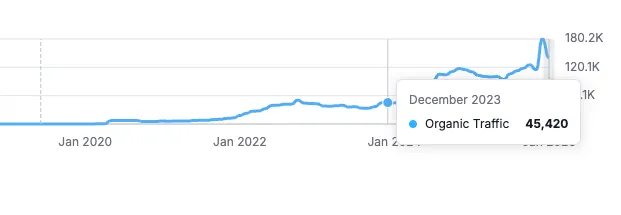
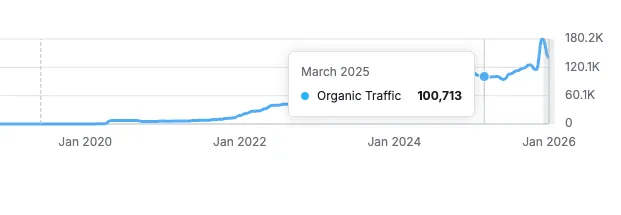 Source: Semrush (monthly organic traffic).
Result (what changed in the org)
- Marketing could publish without engineering involvement for each page.
- SEO pages became a repeatable workflow instead of a backlog.
- Organic traffic went from ~33k/month to ~116k/month over time (3.5x).
What went wrong / what I’d do differently
I was very new to software engineering then and I feel I didn’t make the right abstractions with regards to validation and component structure.